Every IPTV provider in the UK looks the same on the surface: a huge channel number, a low price and a WhatsApp button. The difference only shows on a Saturday night in October. This guide gives you the six checks that separate the providers that last from the ones that vanish, a fair-price benchmark, and the apps worth installing. We run WizTV, so read it with that in mind, then test us against the list.
Run any provider, including us, through these six. A provider that passes all six is rare. One that fails two is a provider you'll be replacing by Christmas.
The UK and Irish channels should be one clean list with working guide data, not scattered through 30,000 foreign channels. Check the sports channels, the terrestrial families, the movie channels and the regional variants.
Any stream looks good at 11am on a Tuesday. Ask how many copies of each busy channel they run, and whether there's a Full HD and an HD version for the nights your own connection is the limit. Then test on a match night.
UK ISPs block known IPTV routes, especially during Premier League fixtures. A provider that answers "use your own VPN" is passing the problem to you. Protected routes should be part of the service.
A short plan on your own TV, in the room you watch in, at the time you watch, with a written refund window if it fails. A "two hours on a demo login" trial tells you nothing; a month with your money protected tells you everything.
You should pay once for the months you choose, see the full price before you pay, and have a stated refund window in writing. Auto-renewal and "no refunds" together are the biggest red flag in the market.
Message them before you buy with a dull technical question and time the answer. Then ask what happens when a channel drops at 9pm on a Saturday. The answer tells you everything about month six.
| What to check | Good sign | Walk away |
|---|---|---|
| Price | A fair price shown in pounds before you pay | £5 a year, or a price that only appears in the chat |
| Billing | One payment for the term, nothing stored | Auto-renewal, or a card kept on file |
| Refunds | A written window, 7 to 14 days | "No refunds" anywhere on the site |
| Testing it | A 1-month plan, full service, your device, refund in writing | A shared demo login, or nothing |
| Channel list | UK list with EPG and catch-up that works | Big number, dead channels, no guide data |
| Peak time | Several copies of busy channels, HD fallbacks | "Freezes a bit during the football" |
| ISP blocks | Protected routes included | "Just use a VPN" |
| Support | A person replies in minutes, seven days a week | Left on read after the payment |
| Website | Real terms, a refund policy, a DMCA page | A one-page site registered last month |
Below these ranges you're buying a reseller with no servers of their own. Far above them you're paying for marketing. WizTV's one-screen prices are in the last column so you can judge us by the same rule.
| Plan length | Fair range, 1 screen | WizTV |
|---|---|---|
| 1 month | £10 to £18 | £14.99 |
| 3 months | £22 to £35 | £25.99 |
| 6 months | £32 to £55 | £34.99 |
| 12 months | £45 to £90 | £49.99 |
Look for every UK sports channel in Full HD and 4K, the 3pm Saturday fixtures, and dedicated event channels for the big fights. Ask specifically about peak-time capacity. What WizTV carries.
The most common UK setup. The provider should give you a Downloader code for a free player and a guide with screenshots, not a YouTube link. IPTV on Firestick.
You want multi-screen plans priced sensibly, not a second login at full price. Two to four screens on one plan is the fair model. How screens work.
Indian, Pakistani, Polish, Arabic, Turkish and African channels should be in their own lists with guide data. Ask for the exact channels you watch, by name, before you pay.
4K needs about 25 Mbps and a 4K-capable device. A provider should offer 4K where the broadcaster sends it, with a Full HD copy for busy nights, and be honest that not everything is 4K.
The cheapest provider that passes all six checks, not the cheapest provider. A 12-month plan on one screen at £49.99 is cheaper per month than almost anything that lasts.
Your provider gives you a login. The app is yours to choose, and a good provider works in all of them.
Every provider quotes a number in the tens of thousands, and most of them are reselling the same upstream list. The number includes hundreds of dead channels, duplicates and feeds nobody in Britain will open. What matters is whether the UK list is complete, whether the guide data is right, and whether the channel you want is actually playing at 8pm on a Saturday. Judge the service on the forty channels you watch, not the forty thousand you don't.
Most IPTV sites in the UK are resellers: they buy credits from a panel and sell logins with no control over the servers. That isn't automatically bad, a good reseller with real support beats a careless provider, but it explains the churn. When the upstream changes its terms or gets blocked, the reseller disappears. Ask how long they've been running, whether they have their own servers or routes, and what happened the last time an ISP block hit. Vague answers are an answer.
Reviews on IPTV sites are easy to fake and hard to verify, ours included. A month on your own device isn't. Test at peak time, on the TV you'll actually use, with the channels you actually watch. Open the guide, replay something from earlier, try a 4K channel against its Full HD copy, and message support with a question in the first week. If it holds up, move to a longer plan; if it doesn't, use the refund window.
IPTV as a technology is legal: it is television delivered over the internet, and the big broadcasters and streaming platforms all use it. Whether a specific stream is licensed depends on the broadcaster's rights. A trustworthy provider is honest about that and publishes real terms, a refund policy and a DMCA page. WizTV does not host or stream any content itself; everything is delivered by third-party providers. Our terms and DMCA policy are a click away.
We built WizTV around the six checks because we'd been the customer on the wrong side of them. UK and Irish channels in their own list, anti-freeze servers sized for match night, protection built into the stream, one payment with a 14-day refund, and a person on WhatsApp seven days a week. That's the claim. A 1-month plan inside the refund window is how you check it.
The one that passes all six checks for the channels you watch: UK channels first, peak-time stability, protection against ISP blocks, a real way to test it, one payment with a refund window, and support after the sale. Test any provider, including WizTV, on a busy night inside its refund window.
A fair range is about £10 to £18 for a month, £22 to £35 for three months, £32 to £55 for six and £45 to £90 for a year on one screen. Far below that you are buying a reseller with no servers of their own.
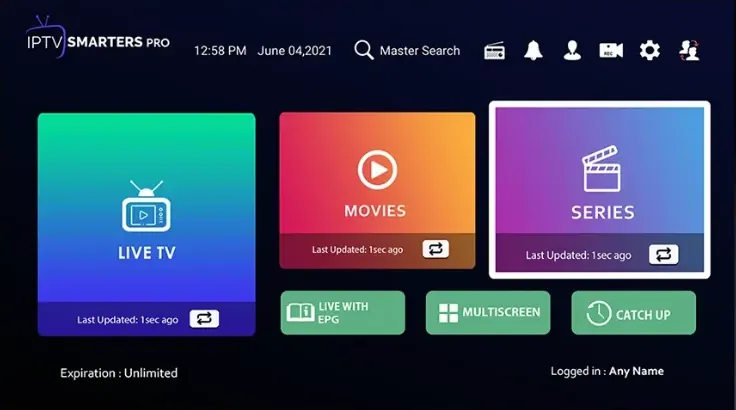
IPTV Smarters Pro for most people: free, on every device, with EPG and catch-up. TiviMate has the best guide on Android TV and Firestick. IBO Player Pro, Bob Player and Hot Player are polished paid options with a trial period.
IPTV technology is legal and used by the big broadcasters and streaming platforms. Whether a particular stream is licensed depends on the broadcaster. WizTV does not host or stream content itself; everything is delivered by third-party providers.
With a provider that builds protection into the stream, no. With one that does not, a VPN set to a UK server helps against ISP blocks but can cause buffering. The best providers make the question unnecessary.
A provider with every UK sports channel in Full HD and 4K, event channels for fights, several copies of busy channels, and servers sized for the Saturday 3pm kick-offs. Ask about peak-time capacity, then test on a match night.
Any good provider works on a Fire TV Stick with IPTV Smarters Pro or TiviMate installed through Downloader. The provider should give you the Downloader code and a step-by-step guide with screenshots.
Most are resellers with no servers of their own. When the upstream service changes terms or gets blocked, they vanish. Ask how long a provider has been running and what happened during the last ISP block.