IPTV Smarters Pro is the most used IPTV player in the UK: free, on every device from a Fire TV Stick to an iPhone, with a programme guide, catch-up and multi-screen. It is a player, not a provider, so it needs a subscription such as WizTV to show anything. This guide covers where to download it for each device, how to log in with Xtream Codes, what every feature does and the fixes for the common errors.
No subscription yet? Pick a plan and your login arrives on WhatsApp in minutes.
Install the version for your device, then come back for the login steps. Each device also has a full guide with screenshots.
Only download Smarters from the developer's own site or your device's app store. Copies on random APK sites are often old or altered.
Three screens. The same steps work on every device.
Open the app and accept the terms. Choose Add User, then Login with Xtream Codes API. Don't pick M3U; the Xtream login gives you the guide and catch-up.
Any name for the playlist, then the username, password and server URL from your WizTV WhatsApp message, exactly as written. The URL starts http:// and ends with a port number.
Press Add User. The first load pulls 35,000 channels and the guide, which can take a minute. After that, open Live TV and set your favourites.
Login rejected? See the errors below, or message us with a photo of the screen.
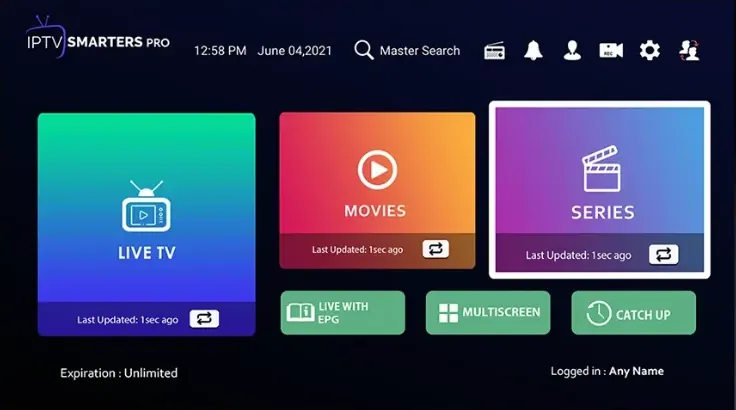
Channels by country and category with the programme guide alongside. Long-press a channel to add it to favourites, and switch the EPG to UK time in settings if it looks offset.
Channels with a clock icon keep recent programmes. Open the channel, choose Catch-up and pick the day and programme.
The on-demand library with posters, descriptions and subtitles where available. Continue Watching remembers where you stopped.
Up to four streams on one screen, handy for a Saturday with several games on. Each counts as a screen on your plan.
Lock categories behind a PIN so the kids' profile stays on the kids' channels.
If a channel has picture but no sound, change the player to VLC or ExoPlayer and the decoder from hardware to software. Fixes most playback oddities.
Check the server URL starts http:// not https://, has no spaces and ends with the port. Username and password are case sensitive. Copy them from the WhatsApp message rather than typing, and make sure you chose Xtream Codes API, not M3U.
Your plan has ended. Message us with your username and we extend the same login, so nothing needs re-entering in the app.
In Settings, Player Selection, switch the live TV player to VLC or ExoPlayer. If that fails, change the decoder from hardware to software. One of the two usually fixes it.
Open Settings, EPG, and refresh. If times are offset, set the EPG time shift to match UK time. Guide data can take a few minutes to download on first login.
Restart the device and router, use 5 GHz Wi-Fi or a cable, and switch to the Full HD copy of the channel on busy nights. Still dropping? Message us and we move you to another server.
On iPhone and iPad the version is called Smarters Player Lite, with the same Xtream Codes login. Our iPhone guide has the steps.
Amazon occasionally removes sideloaded apps on update. Reinstall through Downloader with code 6468112 and add your login again; it is still active on our side.
Open the menu in the top corner and choose Add User, or log out of the current playlist first. Some versions call it Add New User or Login.
Your WizTV login works in all of them. Switch apps without switching provider.
Smarters is a player, like a web browser for television. It has no channels of its own and shows nothing until you log in with details from an IPTV provider. That's why it's legal to download and why it appears in app stores: the content comes from whoever gives you the login. With a WizTV login it shows our 35,000+ channels, the on-demand library, the guide and catch-up.
Both are ways of giving the app your login. Xtream Codes is a username, password and server URL; M3U is a single long link. Use Xtream Codes in Smarters whenever you can. It loads faster, keeps the programme guide and catch-up working, and updates automatically when channels move. M3U is for apps such as IBO Player, Bob Player and Hot Player that log in by MAC address.
The Android and Fire TV app is IPTV Smarters Pro. On iPhone and iPad it's Smarters Player Lite, which is the same app under Apple's rules. Smart TV stores carry versions under slightly different names. All of them take the same Xtream Codes login, so if a guide says Smarters, any of them will do.
Downloaded from the developer's site or your device's store, yes. The risk is the copies on third-party APK sites, which are often old versions or altered. The links on this page go to the developer. The app asks for no account and no payment.
Our Xtream login carries full guide data and catch-up, every busy channel has a Full HD and an HD copy you can switch between on match nights, and protection against ISP blocks is built into the server URL, so there's no VPN to fight with. Pick a plan and the login arrives on WhatsApp in minutes, with a 14-day refund window if the app on your device does not suit you.
Yes. The app is free on every device and asks for no account or payment. It needs a login from an IPTV provider to show anything, which is where a WizTV subscription comes in.
Open the app, choose Add User, then Login with Xtream Codes API. Enter any name, then the username, password and server URL from your provider, exactly as written, and press Add User.
Type 6468112 into the Downloader app on your Fire TV Stick, click Go, then Install.
The iPhone and iPad version is called Smarters Player Lite on the App Store. It takes the same Xtream Codes login.
The app is legal and is a player with no content of its own. Whether what you watch is licensed depends on your provider. WizTV does not host or stream any content itself; everything is delivered by third-party providers.
Almost always a typo in the server URL, a https:// instead of http://, a missing port, or M3U chosen instead of Xtream Codes. Copy the details from your WhatsApp message and try again.
Yes. Install it everywhere and add the same login. Your plan sets how many screens play at the same time.
Yes, on every device. The Xtream login includes the guide and catch-up, and protection against ISP blocks is built in.