The Amazon Fire TV Stick is the most popular way to watch IPTV in the UK, and for good reason: it plugs into any telly, the free Downloader app installs a player in a couple of minutes, and the whole thing costs less than a month of pay TV. This page takes you from a new stick to live channels, with the Downloader codes, the apps worth using and the fixes for when something sulks.
Five steps, about ten minutes. The full guide with a screenshot for every screen is at install on Fire TV Stick.
From the Fire TV home screen, open Search, type Downloader and install the free orange app. It's in the Amazon store, so nothing unusual yet.
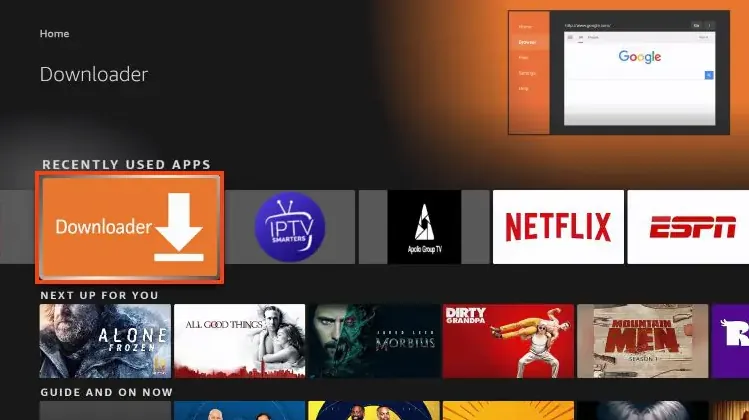
Go to Settings, then My Fire TV, then Developer Options. If you can't see it, open About, click the device name seven times and go back. Then open Install Unknown Apps and turn Downloader on.
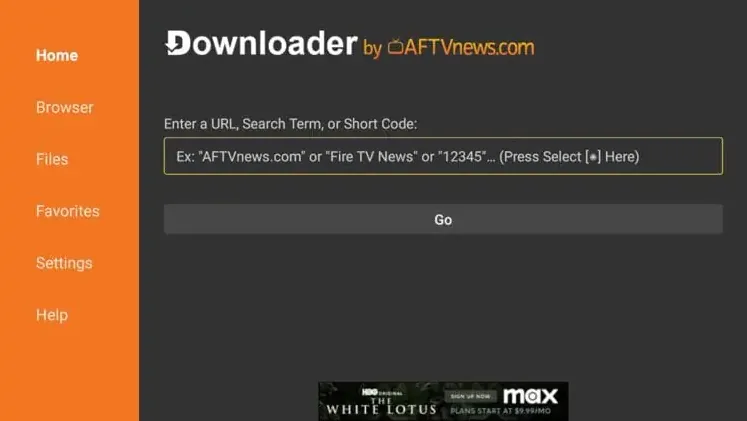
Open Downloader, click into the box and type the code for the app you want. For IPTV Smarters Pro that's 6468112. Click Go, then Install, then Open.
Choose Add User, then Login with Xtream Codes API. Type any name, then the username, password and server URL from your WizTV WhatsApp message, exactly as written. Press Add User.
The channels load into Live TV with the guide filled in. Add your favourites, set the Full HD copy of busy channels as a backup for match nights, and delete Downloader if you like; the player stays.
Send a photo of the screen on WhatsApp and we'll walk you through it, one button at a time.
You only need one. Start with the free one; move to a paid player later if you want a nicer guide.

Free. The standard player: Xtream Codes login, EPG, catch-up, multi-screen. Our first recommendation.
Code 6468112

Trial period, then a small lifetime fee. Fast, polished, logs in with your MAC address and M3U link.
Code 481220

30-day trial period, then a small fee. Clean layout, good on older sticks.
Code 395800

Trial period, then a small fee. Simple, stable, popular on Fire TV and smart TVs.
Code 815778
TiviMate also runs well on the Fire TV Stick and has the best guide of any player; install it from the Amazon store or through Downloader. Full IPTV Smarters Pro guide.
Any of them works. The differences are picture quality, Wi-Fi and how much the stick slows down with a big channel list.
| Model | Picture | Wi-Fi | Our view |
|---|---|---|---|
| Fire TV Stick HD / Lite | Full HD | Wi-Fi 5 | Fine for one bedroom telly. Slower with 35,000 channels; set favourites. |
| Fire TV Stick 4K | 4K HDR | Wi-Fi 6 | The sweet spot for most living rooms. |
| Fire TV Stick 4K Max | 4K HDR | Wi-Fi 6E | Best for 4K sport on busy home Wi-Fi. Faster menus. |
| Fire TV Cube | 4K HDR | Wi-Fi 6E + Ethernet | Wired connection, the most stable option of all. |
| Fire TV Stick 4K Select (2025, Vega OS) | 4K | Wi-Fi 6 | Avoid for IPTV: Vega OS blocks Downloader and sideloading. |
For 4K you need about 25 Mbps at the stick. For Full HD, 10 Mbps is plenty. An Ethernet adapter turns any stick into the Cube's stability for about a tenner.
Settings, My Fire TV, Developer Options, Install Unknown Apps: make sure Downloader is on. Fire TV updates sometimes switch it back off. On the newest Vega OS sticks sideloading is blocked entirely; message us for another way to watch.
Check the code digit by digit. One wrong number opens a different download. Codes on this page are current; if one stops working, message us.
The server URL must start with http://, not https://, and have no spaces or trailing slash. Username and password are case sensitive. Copy them from the WhatsApp message rather than typing.
Restart the stick by holding Select and Play for five seconds. Close other apps, use 5 GHz Wi-Fi or an Ethernet adapter, and switch to the Full HD copy of the channel on busy nights. Still dropping? Message us and we move you to another server.
In the player settings change the decoder from hardware to software, or the player from native to VLC or ExoPlayer. One of the three usually fixes it.
Clear the player app's cache in Settings, Applications, Manage Installed Applications, and set favourites so you aren't scrolling 35,000 channels. A 4K Max or Cube is noticeably faster.
Amazon occasionally removes sideloaded apps on update. Reinstall through Downloader with the same code; your login is still on our side, so you just add it again.
It's cheap, it's in every supermarket, and it runs the same player apps as an Android box without the fuss. Downloader lets you install apps from outside the Amazon store in two minutes, there's a proper remote, and it plugs into the HDMI port of a telly that otherwise can't run apps. For most households it turns a ten-year-old TV into a 4K IPTV screen.
Not with WizTV. Protection against ISP blocks is built into the stream, so there's nothing to install or switch on. If you run a VPN anyway, choose a UK server and turn it off first when a channel buffers; VPN apps on a Firestick are the most common cause of peak-time stutter. Our blog has the longer answer.
The 4K, 4K Max and Cube all play 4K channels; the HD and Lite sticks don't. You also need a 4K telly, an HDMI port that supports it, and about 25 Mbps at the stick. On a busy Saturday, if 4K stutters, the Full HD copy of the same channel is one click away and looks nearly as good from the sofa.
Fire TV updates occasionally remove sideloaded apps. Keep Downloader installed and the code saved in your WhatsApp chat, and a reinstall takes two minutes. Your WizTV login lives on our servers, so nothing is lost.
Everything above needs a username, password and server URL. Choose a plan and the login arrives on WhatsApp in minutes, with a 14-day refund window if it does not suit your stick. It comes with the Firestick guide and a person to message if a step doesn't match your screen.
Yes. Install a player such as IPTV Smarters Pro through the free Downloader app, log in with the details from your provider, and the channels load. It takes about ten minutes on any Fire TV Stick, 4K, 4K Max or Cube.
Type 6468112 into Downloader, click Go, then Install. Codes for IBO Player Pro, Hot Player and Bob Player are listed on this page.
The Fire TV Stick 4K Max for most people: 4K, Wi-Fi 6E and faster menus. The Cube adds an Ethernet port for the most stable connection. Avoid the 2025 4K Select, which runs Vega OS and blocks sideloading.
The Fire TV Stick, Downloader and the player apps are all legal. Whether a stream is licensed depends on the broadcaster. WizTV does not host or stream any content itself; everything is delivered by third-party providers.
Not with WizTV; protection against ISP blocks is built into the stream. If you use a VPN anyway, choose a UK server and switch it off first if a channel buffers.
Usually Wi-Fi in the room, a VPN app, or a peak-time stream. Restart the stick, use 5 GHz or an Ethernet adapter, switch to the Full HD copy of the channel, and message us to move server if it continues.
Yes. Install the app on every device you own. Your plan sets how many play at the same time, from one to four screens.